CVA IEJUR App Launches: A Bespoke Moodle Solution for UK Education
The IEJUR postgraduate VLE is now an app on Google Play and the App Store. Discover how students install it, its features, and lessons for other UK educational providers.
by Cleverson Gouvêa
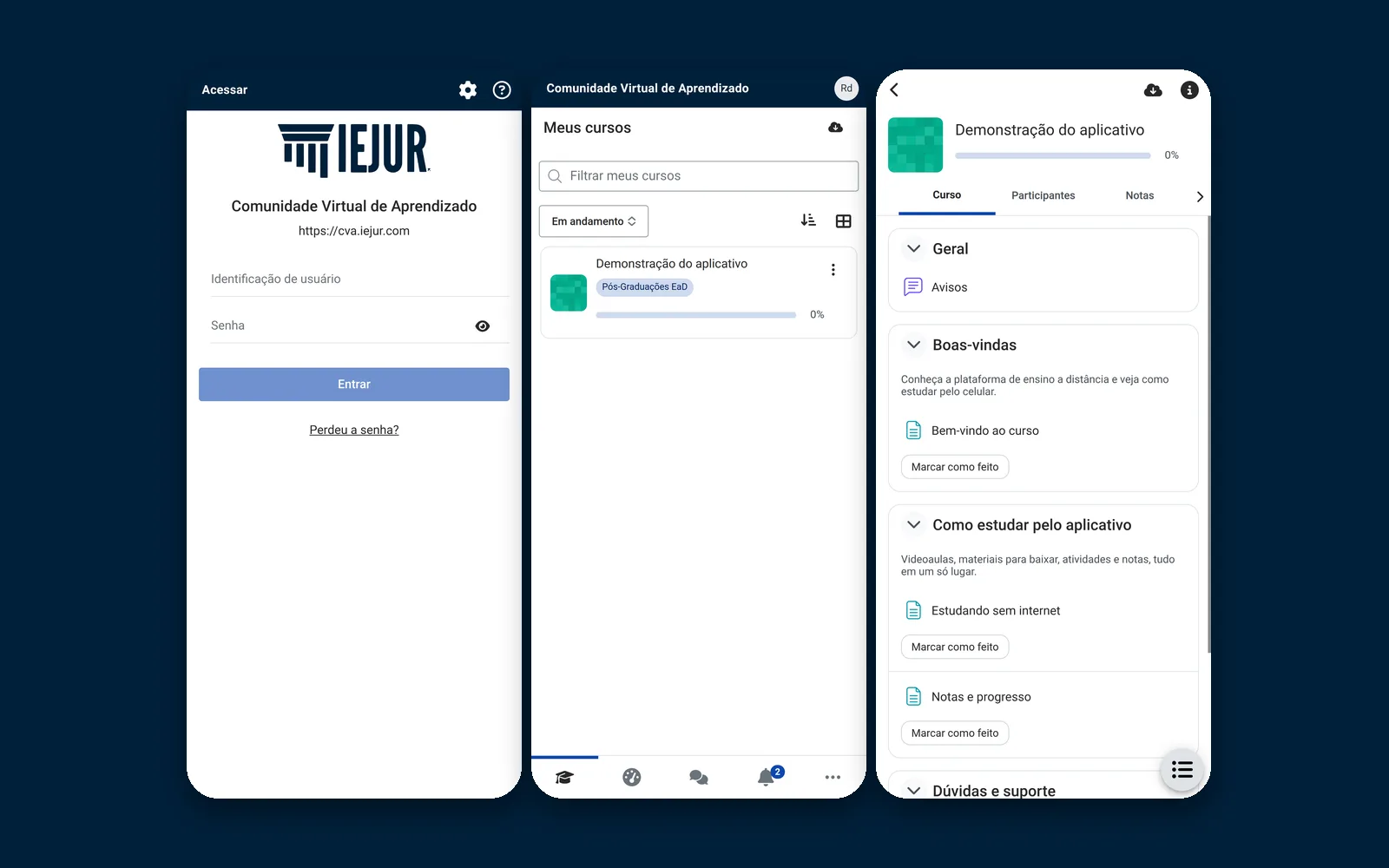
The CVA IEJUR app is now live. The Virtual Learning Environment (VLE) of IEJUR (Instituto de Estudos Jurídicos), the CVA at cva.iejur.com, has its own bespoke app on Google Play and the App Store, published by Agathas Web. Below, we detail how students install it, what the app currently does, and what this launch teaches those looking for their own app.
Summary
The CVA IEJUR app appears in both stores under the name IEJUR. It is free, ad-free, and without in-app purchases.
It was generated from the official Moodle App, version 5.2, with fixed logo, colours, and VLE address. Version 5.2.2 was approved and is live on Google Play and the App Store.
Students log in with the same VLE username and password, view courses, lessons, and activities, and download content for offline study.
On iOS, it is iPhone only (requires iOS 15.0 or later). There is no iPad version.
For other institutions, the path is the same: a well-configured Moodle, developer accounts with the app stores, and ongoing maintenance post-launch.
What the CVA IEJUR App Is and What It Means for Students
Before delving into the product, a necessary disclosure: in addition to being the founder of Agathas Web, I am the CTO of IEJUR. For this project, I was on both sides of the fence – that of the institution needing the app and the company that built and published it. Therefore, this text focuses solely on information that is publicly available and verifiable in the app stores.
The CVA IEJUR app is the official VLE app for IEJUR, which hosts postgraduate and professional development courses in the legal field. In practice, it's the same Moodle that students already use on their computers, but within an app bearing the institution's branding.
What Students Can Do in the App
Access their enrolled courses, lessons, and materials.
Open activities, submit assignments, and complete quizzes.
Monitor grades, progress, and deadlines.
Download content for offline study, a native feature of the Moodle App.
Communicate with tutors and peers via the VLE's messaging and forums.
The app opens in Brazilian Portuguese. The App Store listing also includes Spanish and English, inherited from the Moodle App.
What the App Is Not
It does not create accounts. Access is exclusive to enrolled students, using their registration username and password. Those who forget their password should resolve it with the administration office, as they would for the VLE. There is also no iPad version: on iOS, the app is distributed for iPhone only. Furthermore, push notifications are still being activated, so they are not included in this announcement.
How to Install the CVA IEJUR App: Student Step-by-Step Guide
This is the part that the administration office will share with students. It takes less than two minutes.
On Android (Google Play)
Open Google Play on your mobile phone.
Search for IEJUR or tap this link directly: play.google.com/store/apps/details?id=com.iejur.cva.
Verify that the developer is listed as Agathas Web, then tap Install.
Open the app once the installation is complete.
The current Moodle App requires Android 7.0 or later, according to the official Moodle App FAQ. Older mobile phones will not be able to install it.
On iPhone (App Store)
Open the App Store.
Search for IEJUR or use the link apps.apple.com/br/app/id6836717333.
Tap Get and confirm with Face ID, Touch ID, or your Apple ID password.
The app requires iOS 15.0 or later and occupies approximately 57.6 MB, according to the store listing itself.
Users attempting to install via an iPad will not find the app in a standard search because it was published for iPhone only.
First Login
There's no need to type in the website address. The VLE address is pre-configured within the app, which is one of the key differences compared to the generic Moodle App. Students open the app, enter the same username and password they use for the CVA, and that's it: the course list appears.
How to Study Offline
Within a course, the Moodle App offers the option to download the entire course or specific resources. Download using Wi-Fi, before travelling or in areas with no signal. Activities completed offline will synchronise when the connection is restored, but video lessons hosted outside Moodle, such as on YouTube or Vimeo, will still require an internet connection. I detailed these limitations in the post about the offline Moodle app.
Starting with the Official Moodle App Instead of a Bespoke App from Scratch
The CVA IEJUR app was not developed from scratch. It is generated from the official Moodle App code, which is open-source and maintained by Moodle HQ, in version 5.2. This decision is the most crucial aspect of this case study for any institution evaluating its own app.
What the Institution Inherits for Free
Everything the Moodle App already does well comes included: login via Moodle itself, courses, activities, quizzes, forums, messages, and download for offline study. These are years of development and corrections from a global community. Rewriting this in a bespoke app would be costly and would lag behind with every Moodle update.
What Changes in the Customised Version
ItemGeneric Moodle AppCVA IEJUR AppStore NameMoodleIEJURIcon and ColoursMoodle BrandingIEJUR Logo and ColoursWebsite AddressStudent types URLVLE address fixed in appPublisherMoodle HQAgathas Web, for IEJURCourses and GradesFrom the institution's MoodleFrom the institution's MoodleOffline StudyYesYes
Note the penultimate row: the content remains within the same Moodle. There isn't a second server, a separate student registration system, or another platform for tutors to publish lessons. This is the difference between a well-implemented customised app and an app that simply becomes another system to maintain.
For a list of what changed in the base app in previous versions, it's worth reading the summary of Moodle App 5.1.
Behind the Scenes of Publishing in Both App Stores
Generating the app is the predictable part. What consumes the calendar is satisfying Google and Apple's requirements.
Listing, Privacy, and Classification
Both app stores require a published privacy policy and a data collection form consistent with the app's functionality. The public listing for the CVA IEJUR app shows the result: Google Play states that data is not shared with third parties and is encrypted in transit, and the App Store lists user-linked data, such as name, email, and user ID, all for app functionality.
This form is not empty bureaucracy. Declaring less data than the app actually collects is grounds for rejection and, subsequently, removal.
Apple's Review Process
An app that requires login needs a demo account for the Apple reviewer to log in and navigate, as they are not a student. Without this, the review process halts immediately. Apple also strictly enforces the rule against apps that appear to be merely 'wrapped websites'; the fact that the CVA IEJUR app is the Moodle App, with native features like offline study, helps in this regard.
Two Versions in Two Days
The public history of the App Store shows version 5.2.1 and, subsequently, 5.2.2, with a note indicating an updated icon with the institution's branding and a cleaner access screen. A real launch is like this: the first approved version is rarely the last of the week. Clients need a partner who can resubmit builds without fuss.
iPhone Only, by Choice
Publishing for iPad requires dedicated screens, testing, and screenshots for the tablet. For a postgraduate programme where students primarily study on their mobile phones or computers, an iPad version would represent a cost without a clear return on investment at launch. It was a scope decision, not a limitation of the Moodle App.
The generic step-by-step guide for accounts, certificates, and submission is in the guide on how to publish a Moodle app on Google Play and the App Store. Here, the focus is on what this real-world case study adds.
When a Custom App Makes Sense for Your Institution
The launch of the CVA IEJUR app does not mean that every educational institution should have one. We recommend it when at least two of these indicators are present:
A significant portion of access already comes from mobile. Moodle access reports will confirm this. If students are already studying on their phones via a browser, the app only enhances the experience.
Students get lost in the generic app. Anyone downloading the Moodle App needs to know how to type in the website URL. In large cohorts, this often leads to support requests for the administration office.
Branding is crucial for sales. For postgraduate, MBA, and high-value courses, the institution's icon on the mobile screen becomes part of the product offering.
There's content for offline study. Students who travel, work in the field, or have unstable internet connectivity benefit greatly from downloadable content.
When Not to Proceed
Moodle is outdated or unstable. The app won't fix a slow server. It will only expose the problem to students. First, get your house in order.
The active user base is small, and the course is short. For a cohort of 40 students on an eight-week course, the generic Moodle App resolves the need.
No one will maintain the app afterwards. An app published without maintenance will eventually be removed by the app stores when requirements change.
Costs and Pitfalls That Only Emerge in Practice
The app store fees are low. The real cost lies in the work surrounding them.
ItemReference ValueNoteApple Developer ProgrammeUS$ 99 per yearAnnual fee, as per AppleGoogle Play Console AccountUS$ 25, one-off paymentAs per Play Console HelpMoodle prepared for appVariesMobile service enabled, valid HTTPS, supported versionMaintenanceRecurringNew Moodle App versions and store requirements
The Most Common Pitfalls
Mobile services disabled in Moodle. In Site Administration, the mobile web services feature must be enabled. Without it, the app cannot log in.
HTTPS certificate issues. Browsers sometimes tolerate an incomplete certificate chain; the app will not.
Plugins without app support. Third-party plugin activities may not open in the Moodle App. Test real courses, not just an example course.
Personal Google Play account. New personal accounts require a period of closed testing with testers before publishing to production. An organisational account avoids this step but requires company documentation (e.g., Companies House registration).
Requirements that change annually. Google requires the latest Android API level to accept updates, and Apple periodically raises the minimum SDK. An app that stands still loses the right to update.
In IEJUR's case, the VLE already runs on a server we administer ourselves, with an updated Moodle. This eliminated the first three pitfalls before generating the first build.
How Agathas Web Addresses This
The CVA IEJUR app is the same service we offer to other institutions for a customised Moodle app. It's not an off-the-shelf product: each project starts with the Moodle instance the institution already uses.
What's Included
Moodle Diagnosis: version, mobile service, HTTPS, plugins, and courses that need to function in the app.
App generated from the official Moodle App, with the institution's fixed name, icon, colours, and VLE address.
App Store Accounts and Listings: texts, screenshots, privacy policy, and data forms for Google Play and the App Store.
Review Process Monitoring by Apple and Google, including resubmission of builds when the store requests adjustments.
Post-Launch Maintenance: updates for new Moodle App versions and adaptation to annual app store requirements.
How it Works in Practice
We begin with a conversation about your student base and the current state of your Moodle instance. If the server needs adjustment beforehand, we'll indicate this in the diagnosis, and we can manage it through our managed Moodle hosting. Once the environment is ready, we generate test builds, the institution's team validates them, and only then do we submit them to the app stores.
The developer account can be in the institution's name, with its company registration number (e.g., Companies House registration). We receive access to publish and maintain, but the app is yours.
How to Engage Our Services
A quotation is prepared after understanding your specific scenario. Via the page for a Moodle app with your institution's branding, you can contact us directly via WhatsApp and receive a detailed proposal.
Conclusion: What the CVA IEJUR App Demonstrates
The launch of the CVA IEJUR app shows that a medium-sized institution can have its own app in both stores without reinventing Moodle. The foundation is the official Moodle App, the customisation lies in the branding and fixed address, and the heavy lifting is in server preparation, publication, and ongoing maintenance.
If you are an IEJUR student, search for IEJUR on Google Play or the App Store and log in with your CVA credentials. If you are responsible for a VLE and want the same for your students, start with a diagnosis on the page for our customised Moodle app.
Related posts

Moodle Workplace 5.3 Review: Multi-Tenancy, AI Limits and UK Business Impact
Multi-tenant unified accounts, 500-row AI limits, and an updated catalogue: what Workplace 5.3 delivers and how to replicate it on open-source Moodle.

Moodle 4.5.16 Security Flaws: Breakdown of All 13 Advisories
SQL injection, cross-course IDOR, and SCORM XSS: all 13 November security bulletins explained for UK VLE administrators.

Configurable Reports for Moodle: Critical Security Vulnerabilities and Remediation
Two critical CVEs have hit Moodle’s most popular reporting plugin. Discover whether your VLE is exposed and how to remediate without breaking faculty reports.